
For Shopify stores that take cash on delivery (COD)
Know which COD orders to ship, verify or hold.
ZeroTo100 runs 23 checks on every new order: the phone number, the address, the items and the buyer's earlier orders in your store. An AI (artificial intelligence) check also reviews the shipping address. ZeroTo100 tags the result on the order in Shopify, with the reasons. You decide what ships.

- Low risk
- Verify before shipping
- High risk
- Low risk
Tagged
z100-green. Turn that off with "Also tag low-risk orders" on the app's Settings page in Shopify admin. - Verify before shipping
Tagged
z100-review, with up to three reasons in plain words. - High risk
Tagged
z100-high-risk, with up to three reasons in plain words.
The picture is an illustration. The mix of orders it shows is not data.
How it works
Install
You add ZeroTo100 from the Shopify App Store. There is nothing to set up on your theme or checkout.
Every new order is checked
It gets Low risk, Verify before shipping or High risk, with up to three reasons in plain words.
Filter your Shopify orders by the tag
In Shopify admin, open Orders and filter by the ZeroTo100 tag. You decide what ships.
Most checks that compare a buyer's earlier orders look back 30 days. They become more useful as your store builds up order history.

The middle of the page is left out
Scroll sideways to read the reasons
How the checks work
Every new order goes through 23 fixed checks, plus the AI address check described below. Each check that matches adds to the order's risk. The total decides the result: Low risk Verify before shipping or High risk.
The order then gets a tag and up to three reasons in plain words. The checks are the same for every store. You cannot change them, and we do not publish the scoring.
Some parts are tuned for India today: the phone-number checks, how phone numbers are matched across orders, the postal-code table and the high-value threshold. The other checks are not specific to any country.
1. Is the phone number real?
A missing number, a number with fewer than 10 digits, or one that looks made up: all one digit, a running sequence such as 1234567890, or one that starts with 0000. A leading +91 (India) or a single leading zero is removed before the count when that leaves 10 digits. This works from your first order.
2. What has this phone number done in your store?
One phone number sending orders to several addresses. The same product going to different addresses. Several orders in one day or one week. One phone number used under different names. Most of these checks use your store's orders from the last 30 days, so they have no history on the day you install. Outside India, the same number written with and without its country code counts as two phone numbers.
3. Is the address consistent?
The postal code does not match the city or state. This uses a partial table of Indian PIN codes, and Indian city spellings such as Bangalore and Bengaluru count as the same city; codes not in the table are skipped. The table is looked up by the code alone, not the country, so a postal code from another country with the same six digits as an Indian PIN code can be flagged by mistake. The billing and shipping postal codes differ. One address used with many different phone numbers. The same product sent to the same address again.
4. Is the order unusual?
A high-value order. A large quantity of one item. A new phone number placing a high-value COD order. High value means an order total of 10,000 or more. The number is compared as it is, with no currency conversion: 10,000 rupees and 10,000 dollars are treated the same. This threshold is fixed and cannot be changed today.
5. Has the way they pay changed?
A buyer who paid online last time and now chooses COD. A new phone number paying by COD. A single item, quantity one, on COD. Each of these counts only a little on its own.
6. Have this buyer's earlier orders come back undelivered?
A phone number or address whose earlier orders the courier sent back to the store instead of delivering them. This check needs delivery results from couriers. ZeroTo100 does not receive them yet (a courier connection is coming soon), so today this check has no data to use.
Plus an AI address check.
It rates whether the shipping address can be delivered, and it can suggest a corrected address in English, for example when the address is written in a local script or has a spelling mistake. Only the shipping address (street, city, state or region, and postal code) goes to an outside AI service provider; not the buyer's name, phone number or email as separate fields. Details on the Security page.
Plus: duplicate rules you set yourself
In the ZeroTo100 dashboard, under Settings > Validation Rules, you choose which fields mark a repeat: phone number, postal code, email or order number. A repeat order is then tagged z100-duplicate instead of a risk tag. Matching is exact: the same phone number written with and without its country code counts as two different numbers. No duplicate rule exists until you create one.
How to use it with COD orders
In Shopify admin, open Orders and filter by tag. We suggest checking z100-high-risk and z100-review once before each courier pickup.

Scroll sideways to see the Tags column
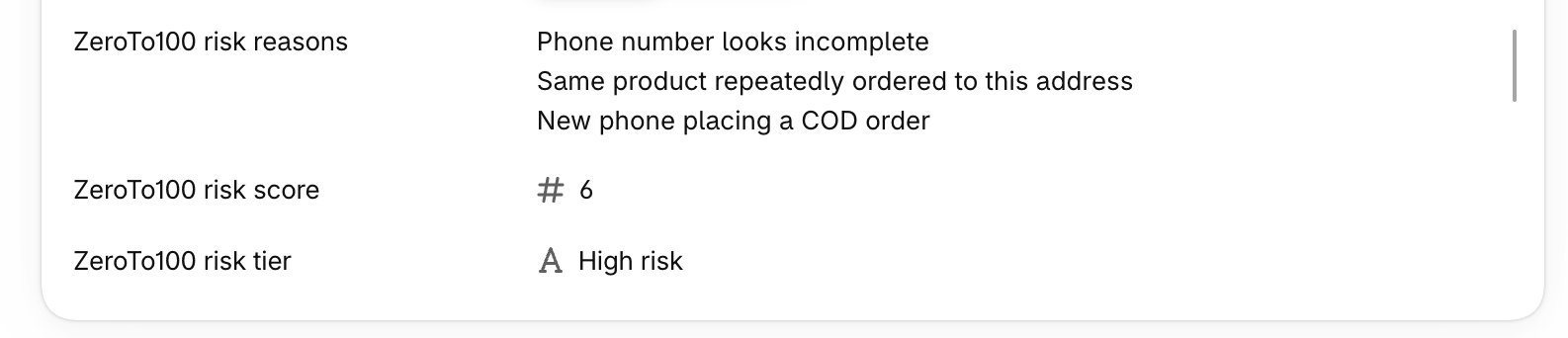
z100-high-risk. Test orders on our own store; the other tags in the picture are our test labels.| What happened | What you see on the order | What you can do |
|---|---|---|
| A first-time phone number places a large COD order. | z100-high-risk · "New phone, COD and high value together" | Call before you pack it, or ask for part payment online. |
| The phone number is 99999 99999, or has only 8 digits. | Adds risk; with a new phone number on a COD order, it is tagged z100-review · "Phone number looks fake or a test number" or "Phone number looks incomplete" | Confirm the number with the buyer, or cancel. Without a working number, the courier cannot reach the buyer. |
| One phone number orders the same item to three addresses in two weeks. | Risk tag · "Phone ordering same product to multiple addresses" | Hold the orders and call the buyer. Ship one, not three. |
| Four orders from one phone number in one afternoon. | Risk tag · "Burst of orders from one phone in a day" | Check whether it is one real order placed several times before you ship any of them. |
| Postal code 560034 (India) with city "Mumbai". | Risk tag · "Pincode does not match city or state" | Confirm the address before it goes to the courier. This check uses a partial table of Indian PIN codes. |
| You set a duplicate rule on the phone number. The same phone number orders again within your time window. | z100-duplicate | Merge or cancel the repeat. It appears only because you made the rule. |
Undelivered orders: a phone number or address whose earlier orders the courier sent back to the store gets a risk tag · "Phone has a high return-to-origin history" (return-to-origin means the courier returned the order to the sender). This check needs delivery results from couriers. ZeroTo100 does not receive them yet (a courier connection is coming soon), so today it has no data to use.
Low-risk orders get z100-green too. Turn that off with "Also tag low-risk orders" on the app's Settings page in Shopify admin. ZeroTo100 does not cancel, hold or message anyone. It only tags and explains.
What it does not do
- It does not cancel or hold your orders; it changes nothing on them except its own tags and fields. You decide.
- It does not message your buyers.
- It does not cancel orders automatically or send one-time passcodes (OTPs).
- Today it sends no WhatsApp messages.
- It keeps no blocklist shared across stores.
- Today it has no courier or fulfilment connection, and it does not check which couriers deliver to an address.
- It does not touch your checkout or your theme.
- It never changes your own tags. It only adds and removes tags that start with
z100-.
Coming soon: not available today.
We plan two additions: WhatsApp, for acting on a result, and a courier and fulfilment connection. Neither is in ZeroTo100 today, and we have not set a date. Would you use either? Email founder@zeroto100.app and tell us how.
Pricing
Billed by Shopify, in USD. Prepaid orders are free.
Free
$0
100 COD orders a month
Maximum charge$0
Basic
$10/month
1,000 COD orders, 21-day free trial
Maximum charge$20 a month
Premium
$29/month
5,000 COD orders, 21-day free trial
Maximum charge$54 a month
Who runs it
ZeroTo100 is new. It is built by an engineer and run by a human together with AI.
Email founder@zeroto100.app and you will get a reply from the person who built it, within one business day.
Questions
Does ZeroTo100 cancel or hold my orders?
No. It gives each order a result and the reasons. You decide whether to ship, call the buyer or cancel.
What does it change in my Shopify store?
It adds its own tags, all starting with z100-, and its own order fields. Your own tags are never touched.
Which orders count towards my plan?
Only COD orders. Prepaid and test orders are free. So is an order cancelled before we count it. The same order is never counted twice.
When can I install it?
ZeroTo100 is coming soon to the Shopify App Store. Email founder@zeroto100.app and we will tell you when it is listed.